Categorizing Expenses
Categorizing is a powerful way to organize your expenses. It helps you choose which expenses you see and create focused expense reports.
Why categorize
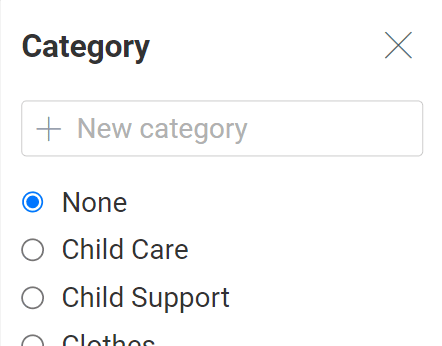
Categorizing gives you the flexibility to view certain expenses at a time.
For example, instead of seeing all 300 of your entries, you could narrow down to the 15 in the "therapy" category.
It also lets you create any expense report you could need.
For example, make a report on last year's child care expenses to convince your co-parent that you need a more affordable day care. Or make a report on all the categories you pay for by yourself — it could help you ask the court for more child support.
Tips:
- Assign a category each time you enter an expense. It's easier than going back to do it later.
- Use categories consistently. For example, if you assign "lacrosse fee" to the "sports" category this time, assign it there every time.
Making new categories
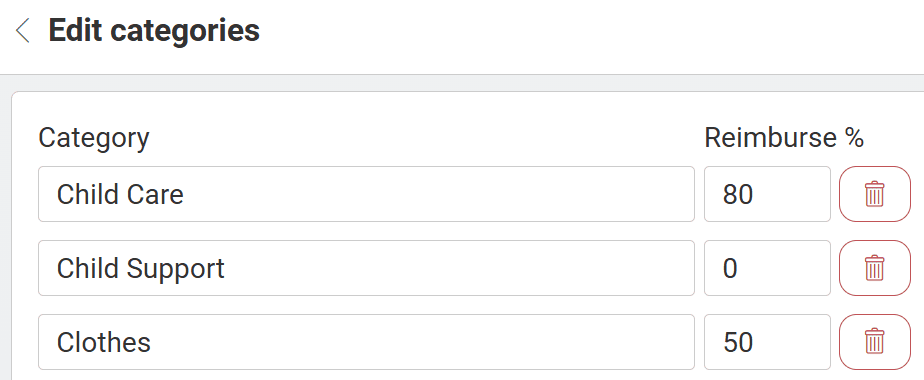
The most common categories are built-in. In "edit categories," you can add more.
Tips:
- You typically don't need a new category if it will only have one or two expenses.
- Expenses in one category are usually split the same way (e.g., 60/40). Otherwise, they probably belong in separate categories.
- If you've linked accounts with your co-parent, they'll see the categories you make and be able to use them.
Editing existing categories
On the "edit categories" page, you can also:
- Set your co-parent's reimbursement percentage for each category. The app will remember it for future expenses (but you can override it).
- Delete categories you don't plan to use.