VS. child custody
By April Bowen, 5/6/09

Disclaimer: This review should be treated as advertising material, and is brought to you by Custody X Change.
Our Family Wizard® is a registered trademark of Kathleen W. Kissoon.
Will Our Family Wizard® help you with your custody situation?

To help you figure this out (before you purchase it), I've done a review of Our Family Wizard® that explains the function of the program and who it can help.

Basically, Our Family Wizard® will only help a select group of divorced parents--ones who need a shared communication center with the child's other parent.

To give you an idea of alternative programs, I compare the features of Our Family Wizard® to the custody software Custody X Change. I'm very impressed with Custody X Change and I think that the program can help pretty much any and every divorced parent, whereas Our Family Wizard® will only be useful to parents who need a structured way to communicate online.

Read on to know which software is a better fit for your custody needs.
Our Family Wizard®

On the webpage of Our Family Wizard®, it states "We help parents who are separated, divorced or living apart and the family law professionals who work with them manage communication, parenting time schedules, children’s’ activities, expenses and other important information using our website." This is an accurate representation of the program. Our Family Wizard is an online program that allows parents to log into a shared communication center. The features of this center include:

1. A shared calendar of visitation and events.


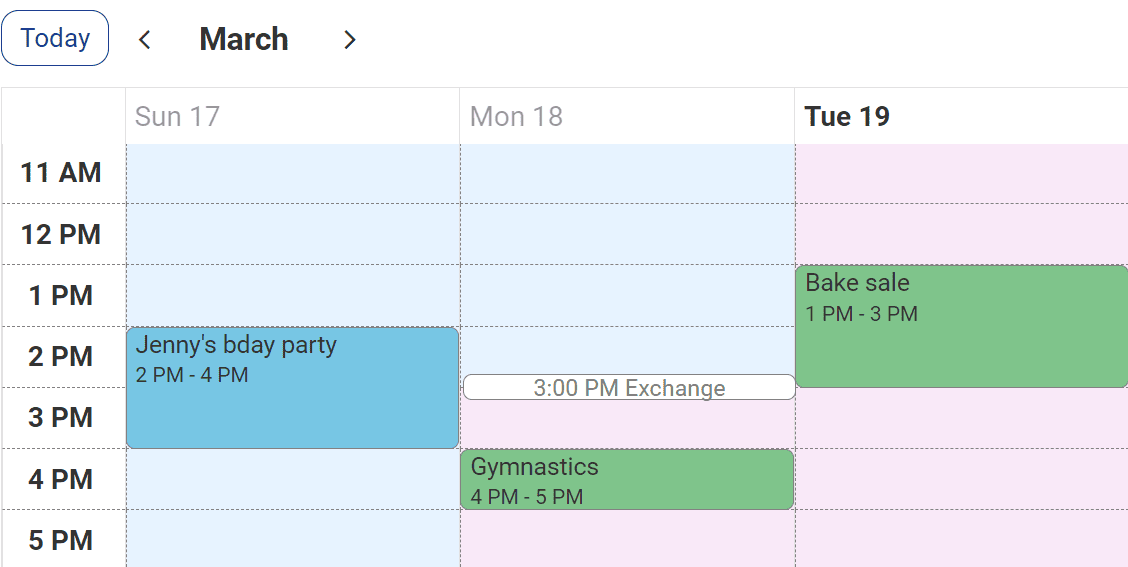
This calendar has different colors for each parent and shows the custody and visitation schedule. An important thing to note, though, is that it appears you can't really create a custody and visitation schedule with this tool--it would take far too much time and effort because you put in the information by clicking on the day (instead of using repeating cycles, etc.). But, you can put in the events for a month to keep track of things. There are also symbols that can accompany the event--like, a soccer ball for a sporting event. Both parents are able to see the calendar and schedule in events. You can also put in requests for visit changes so the other parent is alerted.


2. A Message Board


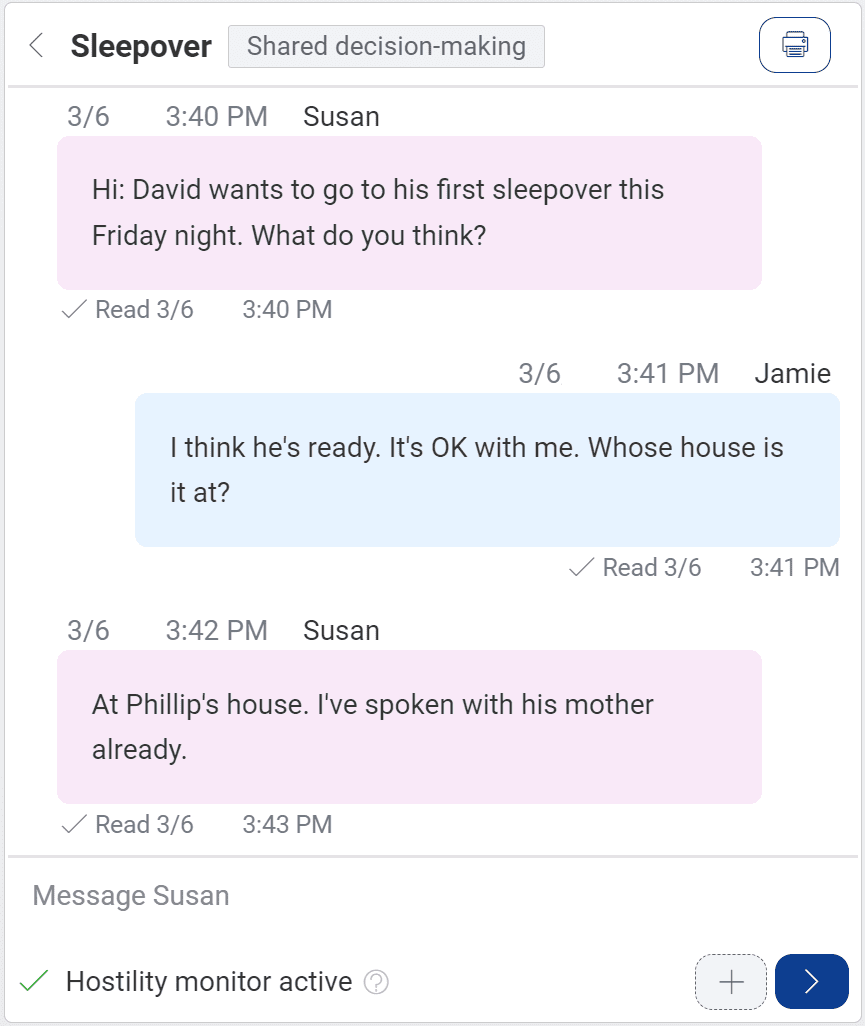
This is a place for parents to email each other. The program alerts you when you get new messages--just like email. It is nice to have all of the custody information in one place. You can print out emails if you need to keep a log of communication.


3. An Information Bank


The Information Bank includes a spot to keep information for: health issues, insurance, addresses, child care providers, school info, and extra-curricular events. This is essentially a file folder to keep your information.

4. Tracking

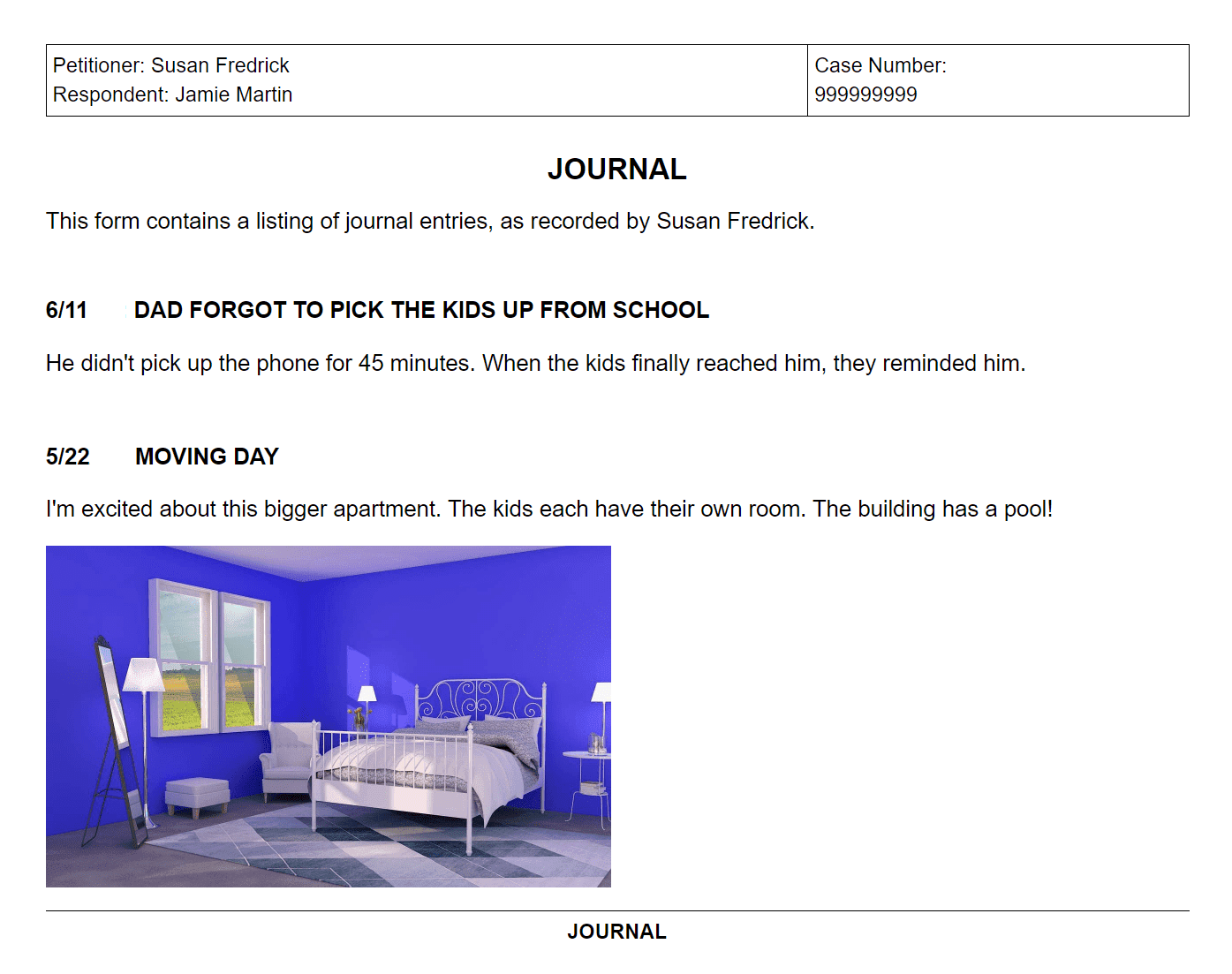
Our Family Wizard® allows you to keep an online journal (either private or shared) where you can record information about visits. You are the only person who is allows to edit your entries. The program also lets you keep track of expenses.


You can put in expenses and who paid them--the color of the parent is shown. You can also mark the expenses as paid.


5. Access


Our Family Wizard® lets you set up an account for both parents to have access and also lets you set up accounts so your children have limited access. You can also allow a professional to monitor your situation--like, if you want your family counselor to be able to see the interactions between the parents. You can also export all of the information to PDF if you need to print.


6. Pricing / Customer Support

Our Family Wizard® costs $99.00 for each parent for one year and $179.00 for each parent for two years. The professional prices are more. For customer support, the program includes a Help file, Tutorials, an manual you can download, and an email and phone number.
Custody X Change

Custody X Change is a software program that lets you create an entire parenting plan and custody agreement. Before I show you the features, I want to emphasize that the interface is very user friendly. It was so easy to figure out and use the program--such a nice change from most software! Here are the features:

1. Creates a custody and visitation schedule that includes your vacation time, holidays, and special events.

The program is built on layers so it is easy to add each schedule to your calendar. This also makes it really easy to change things because if you change something (like the start day of your schedule) it doesn't mess up the days.


The first layer is the repeating cycle. On this screen you can choose from along list of default plans or custom make your own. You choose the day to apply the repeating cycle and you can choose a default exchange time.


You can then go to the vacation tab and either schedule in an vacation times, or include an unspecified vacation clause in your agreement.


The holiday schedule is very simple to add. You go to the list of holidays and click what parent has custody that day. You can set the times of the holiday and even extend the holiday for several days. The list of holidays is very inclusive--it has pretty much every holiday for a school-age child. You can also create any holidays you want.


Along with holiday and vacation time, you can add any type of special event. You can put in one-time events or recurring special events. The program's interface really shines here. You can simply click on any day and drag to the times you want to event or visitation to last. It's so easy! You can also type in the times. You can see the special events that I've added in.

You can print off the calendar for as many months as you'd like.


2. Takes your schedule and creates a custody agreement using legal jargon.


You end up with a very nice looking document that explains the repeating schedule, outlines vacation time and shows the holiday schedule. You can easily submit this to court or give it to your attorney to use.


3. Keeps track of time-share and overnight percentages.

At the bottom of the calendar, it shows you the time-share percentage the child has with each parent.


This is nice because you know exactly how much time you are getting with your child, and it is also very important for your child support payments. Pretty much every state uses either the time-share percentage or overnight percentage (Custody X Change calculates both) to calculate child support. These numbers are also extremely difficult to calculate without software. Many courts and attorneys don't even bother to come up with the right amount. They make a guess. With Custody X Change though you have the exact amount--so you can make sure you are paying the right amount of child support. And, you can experiment with different custody and visitation schedules (which will impact the time-share percentage) so you can lower your support payments. This is a great feature.

And you can print out a very professional looking report of the time-share percentage. It shows the calculations for every day and then gives a total at the end.


4. Includes Parenting Provisions in your custody agreement.

The program includes a long list of the common parenting provisions that you can read through and check if you want included. This is useful because most parents don't know what parenting provisions even are, no less how to include them in their custody agreement...


(these are just the first few provisions--there is quite a long list to choose from)

Once you check the provision, it prints out like this:


5. Reports

All of these reports create a thorough, professional child custody agreement or parenting plan. The information can be exported to Microsoft Word and PDF if you need to make any changes to them. Parents can use this to prepare for mediation and court and even save money in legal fees because they can create the documents they'd normally pay a lawyer to create.


6. Pricing / Customer Support

Custody X Change has a few versions and ranges in price from 147 to 297. You can download a free 30 day trial so you can see how the program can help you. For customer support, the program offers a Help file and page, FAQ page, online videos and tutorials, and an email address and phone number for questions.
Final Comparison
Our Family Wizard® targets a specific demographic of divorced parents. The program serves the sole purpose of enhancing communication. There isn't really anything the program does that you can't do some other way--like using regular email, keeping the children's info in a different file, using Excel to track expenses, etc. But, it could be helpful for a parent to keep everything together in one place and to have a center to see a shared calendar. If this is what you need, than Our Family Wizard is the thing for you. One big downside to the program is that there isn't a free trial or demo (just an online tour). The website has a few screen shots as the only information to help you decide to purchase.
Custody X Change appeals to a larger audience. Any parent going through a divorce can use the software to create their custody agreement. It encourages parents to work together because it is so easy to make changes to the schedule and to experiment with options. It is also very beneficial to parents who are preparing to go to court, mediation, or even just meeting with the other parent. After a divorce is finalized parents still need Custody X Change to create their schedule year after year. Because it includes vacation and holiday time the program is always valuable.
Price Comparison: Custody X Change costs a little bit more upfront (147-297), but it is a one-time fee. Our Family Wizard® charges every year to use the service (99 for each parent), and so it can end up costing parents quite a bit more. And if you stop paying your Our Family Wizard® fees can no longer use their service.
Recommendation: The two programs could actually be used together. Because Custody X Change focuses on creating the custody agreement and Our Family Wizard focuses on working with the other parent to uphold the agreement. So I would encourage any parent who purchases Our Family Wizard® to also look into Custody X Change--that way you have everything covered. But if you had to just choose one to use, I'd definitely choose Custody X Change.
Download Your Free 30-Day Trial of Custody X Change:

Simply fill out your name, email address, and check the YES box.
Then click the button once to start your free and fast download:
Name:  
Email:  
I'm a: Father Mother Legal Professional  
YES! I'm ready to start my FREE trial of
              Custody X Change right now.
 

Q: Why ask for my name & email?
A: To answer questions, give bonuses, and send updates.