
4-3 Custody and Visitation Schedule Examples
The 4-3 schedule is a residential schedule where your child spends four days of the week with one parent and the other three days with the other parent.

Here is the 4-3 schedule in the calendar.
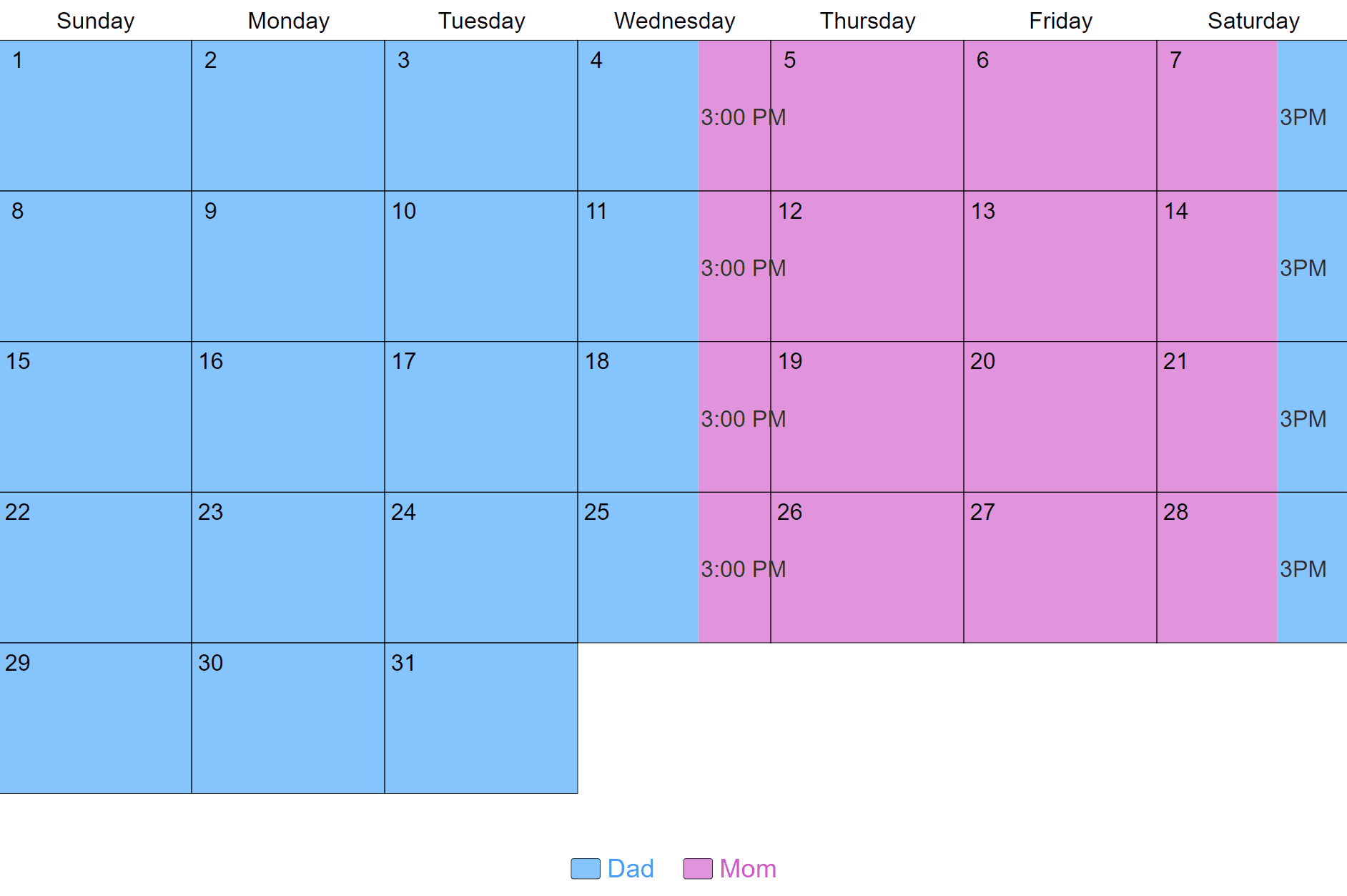
The 4-3 schedule gives one parent 60% of the time with the child and the other parent 40%.
Depending on what day you start the schedule you may have a 3-4 schedule. This is a variation of the same one-week repeating schedule.
Visualize your schedule. Get a written parenting plan. Calculate your parenting time.
4-3 sample schedules
You can modify the basic 4-3 schedule so it works better for you. Here are some sample 4-3 schedules.
Change the exchange day
This 4-3 schedule starts on Sunday and has exchanges at 8:30 am. You can pick any day for the schedule to start and any time for the exchanges.

Change the exchange time
This 4-3 schedule starts on Friday and has exchange times at 12:00 pm. If you start the schedule on Tuesday it is a 3-4 schedule.

Use 3rd-party time
This 4-3 schedule shows when the child is in day care and not with either parent. Including 3rd party time changes the timeshare percentage from 60/40 to almost 50/50.

Calculate your time
As you make your 4-3 schedule, a visitation timeshare calculator can show you the exact amount of time each parent has with the child. This helps you as you customize your schedule so you still have the parenting time split that you want.
Pros and cons of a 4-3 schedule
Pros:
- Each parent is able to spend time with the child during the week.
- The simple one-week rotation is easy to remember and provides routine.
- The child doesn't go for long periods of time without seeing either parent.
- 4-3 schedules are shared parenting schedules, so both parents get to provide day-to-day caretaking.
- 4-3 schedules can work very well with different types of work schedules.
- There are only two exchanges, and you can usually plan these around school or day care.
- Parents both have a lot of time with the child, so there may be less fighting over the schedule.
Cons:
- Children may have a hard time moving from home to home each week.
- Parents must both live fairly close to each other and the child's school.
- Parents must communicate well about what is going on with the child's school, homework and other activities.
The easiest way to make a 4-3 schedule
There's a lot to think about when you build a parenting time schedule. You'll want it to address holidays and school breaks, give the right amount of time to each parent, and work for years to come.
The Custody X Change app makes it easy. Just follow the steps to make a custody schedule.
On Step 2, choose "custom repeating rate." Set your schedule to repeat every seven days.
On Step 3, give one parent three or four consecutive days. The app will automatically give the rest of the week to the other parent.

To make a custody schedule quickly and affordably, turn to Custody X Change. You'll get a written schedule and a visual calendar that meet your family's needs, as well as court standards.
Visualize your schedule. Get a written parenting plan. Calculate your parenting time.